Learn how to configure 2o2code Spamless Forms, understand each protection setting, review Activity safely, and troubleshoot common form-submission issues.
2o2code Spamless Forms is a privacy-first WordPress anti-spam plugin. It checks supported form submissions locally, without CAPTCHA challenges or an external anti-spam scoring API. Normal visitors do not need to solve puzzles or complete extra steps.
This provides privacy-first WordPress spam protection and no CAPTCHA WordPress anti-spam for supported form flows.
What Activity stores
When logging is enabled, Activity stores minimal decision metadata. It does not store complete form submissions, raw IP addresses, raw email addresses or raw user agents.
The six admin pages
Dashboard
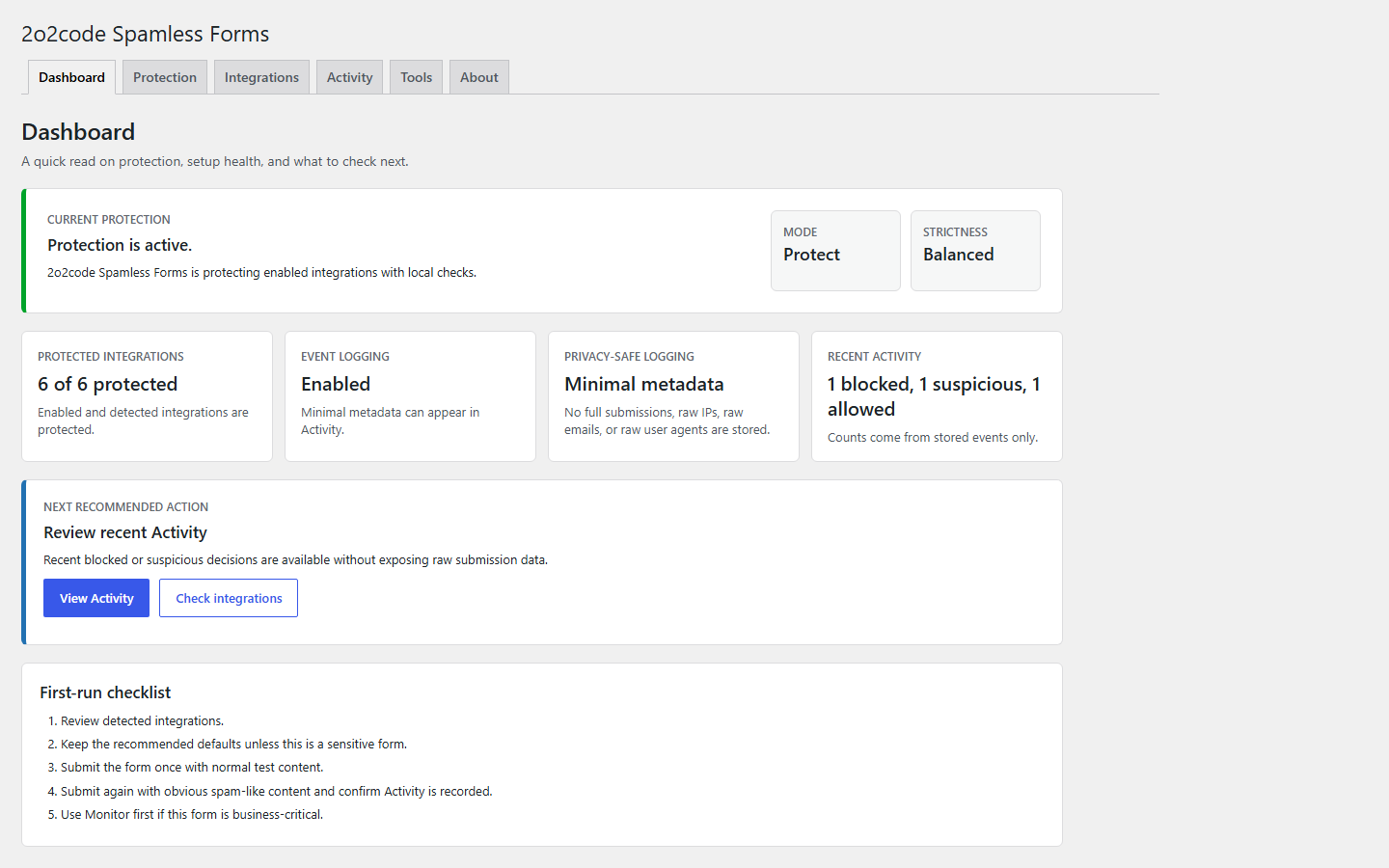
Protection status, setup health, integration summary and the next recommended action.
Protection
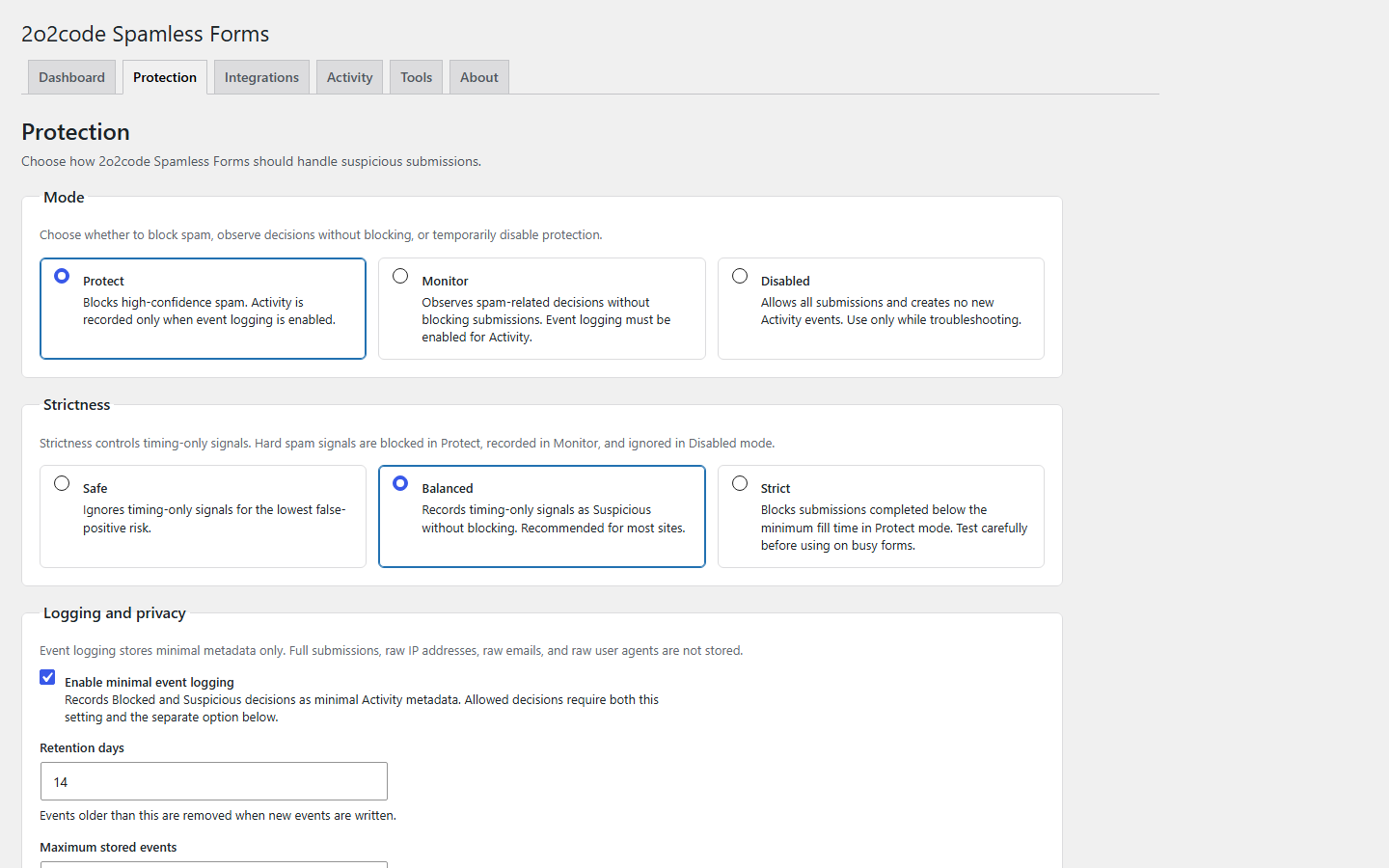
Mode, strictness, logging, uninstall behavior and advanced thresholds.
Integrations
Detection and protection preferences for each supported form flow.
Activity
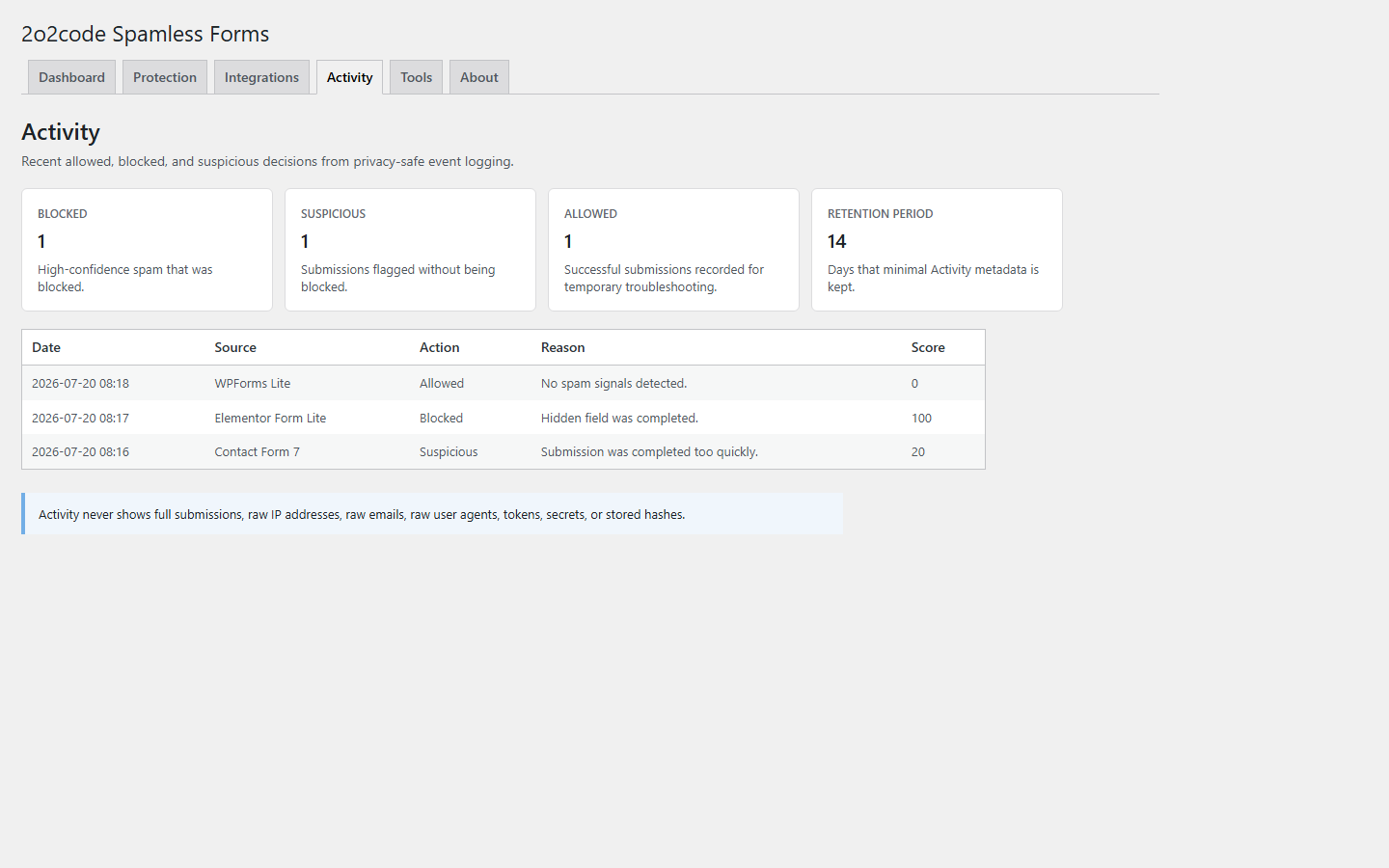
Allowed, Suspicious and Blocked decisions recorded with minimal metadata.
Tools
Support-safe WordPress, PHP, runtime and integration diagnostics.
About
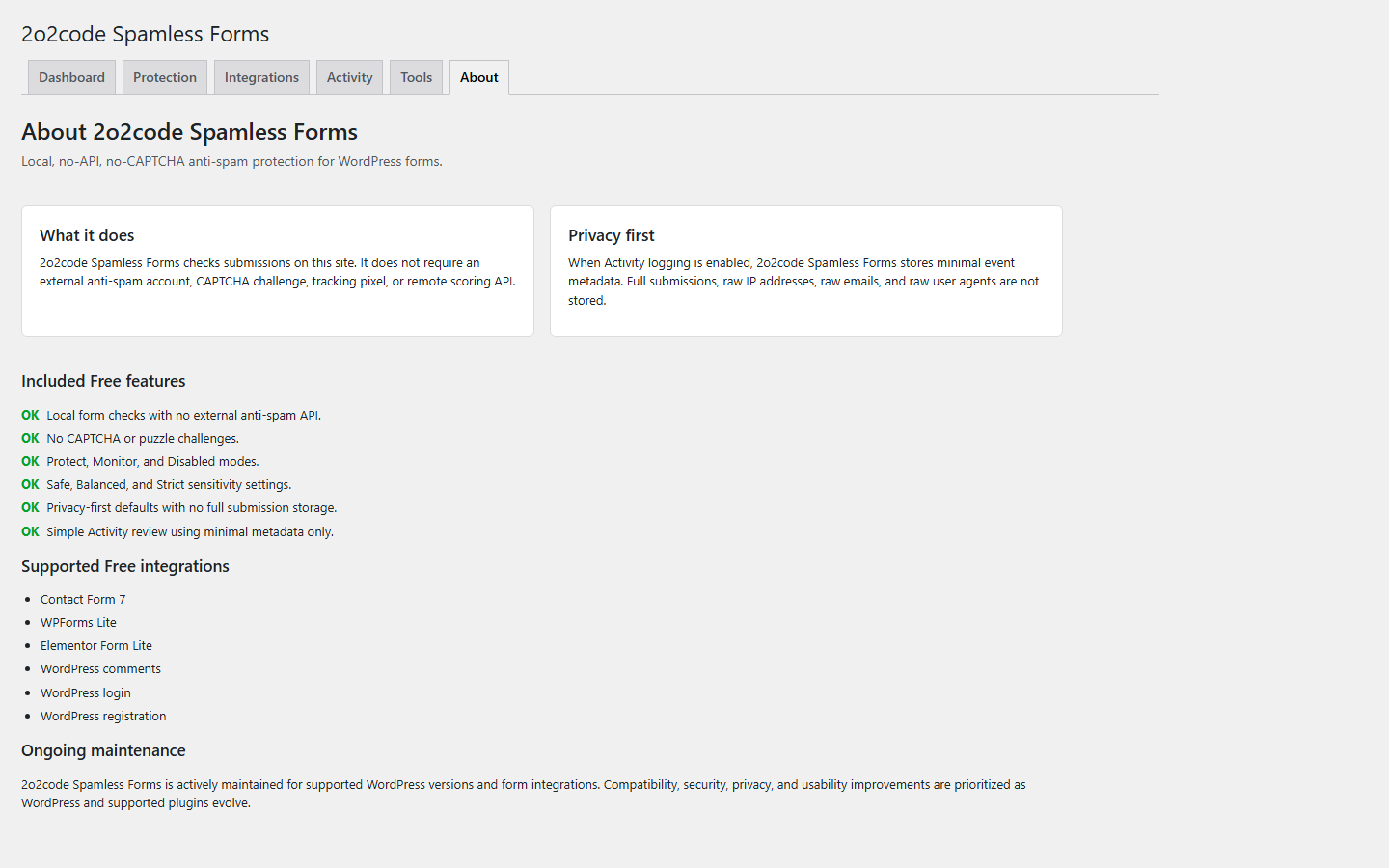
Free features, supported integrations, privacy behavior and maintenance information.
About summarizes the local, no-API and no-CAPTCHA protection model.02
Use Protect with Balanced strictness, keep the advanced defaults, and test before changing sensitivity.
Set Mode to Protect.
Set Strictness to Balanced.
Enable Event logging.
Keep Log allowed submissions disabled unless you are troubleshooting.
Set retention to 14 days and maximum Activity records to 100.
Leave Advanced Settings at their defaults.
Open Integrations and confirm the form flows you use are detected and enabled.
Submit one normal test message and confirm the form’s normal success response.
Submit one obvious synthetic spam-like test using no real personal data.
Open Activity and review the status and human-readable reason.
04
Dashboard
The Dashboard gives a quick read on current protection, mode, strictness, detected integrations and recent Activity counts.
Protection status confirms whether Protect, Monitor or Disabled is active.
Integration summary changes wording with the selected mode: protected, monitored or ready.
Allowed, Suspicious and Blocked counts come only from stored Activity events.
Next recommended action points to the most useful setup or review step.
No Activity on a new site?
This is normal. Allowed submissions are not recorded by default, and a quiet site may have no Suspicious or Blocked decisions yet.
Dashboard shows protection status, setup health and the next recommended action.05
Protection modes
Mode
Blocking
Activity
Best use
Protect
High-confidence spam can be blocked.
Recorded when event logging is enabled.
Recommended production mode.
Monitor
Submissions are not blocked.
Spam-related decisions can appear when logging is enabled.
Testing a business-critical form or troubleshooting.
Disabled
All submissions are allowed.
No new events are created.
Temporary full bypass only.
New site: start in Monitor briefly if the form is business-critical.
Normal production site: use Protect.
Troubleshooting: use Monitor while reviewing reasons.
Remember to re-enable protection
Disabled keeps saved settings but turns checks and new Activity events off.
Protection contains mode, strictness, logging, privacy and advanced controls.06
Strictness
Strictness mainly changes how timing-only signals are handled. It does not make Disabled block submissions, and Monitor still does not block.
Level
Timing-only behavior
Recommended use
Safe
Ignored. Hard spam signals still work in Protect.
Very short forms or audiences likely to submit quickly.
Balanced
Recorded as Suspicious but not blocked by itself.
Recommended default for most sites.
Strict
Below-minimum fill time is blocked in Protect.
Only after Activity review confirms low false-positive risk.
Example: A quick legitimate newsletter submission may be better suited to Safe or a lower minimum fill time. A longer enquiry form can normally stay on Balanced. Test Strict in Monitor first.
07
Logging and Activity
Event logging
Master switch for all new Activity records.
Log allowed submissions
Works only with event logging and Protect or Monitor. Use temporarily for testing because it creates more records.
Retention period
How long minimal Activity metadata is kept. Default 14 days; allowed range 1-90 days.
Maximum event records
Upper storage limit regardless of retention. Default 100; allowed range 25-1000.
Decision statuses
Allowed: no spam signals were detected.
Suspicious: one or more signals were noticed, but the submission was allowed.
Blocked: the submission was stopped in Protect mode.
Higher scores indicate stronger combined spam signals. Scores are not probabilities. Use the status and human-readable reason when deciding what to change.
Activity explains decisions without exposing complete submissions or raw identifiers.08
The Free version does not store complete form submissions.
Raw IP addresses, raw emails and raw user agents are not stored or displayed.
Minimal metadata may be stored when event logging is enabled.
Disabling logging stops new Activity records.
Existing records remain subject to retention and maximum-record limits.
Accurate privacy wording
The plugin does not claim to store no data at all. Minimal decision metadata is stored when Activity logging is enabled.
09
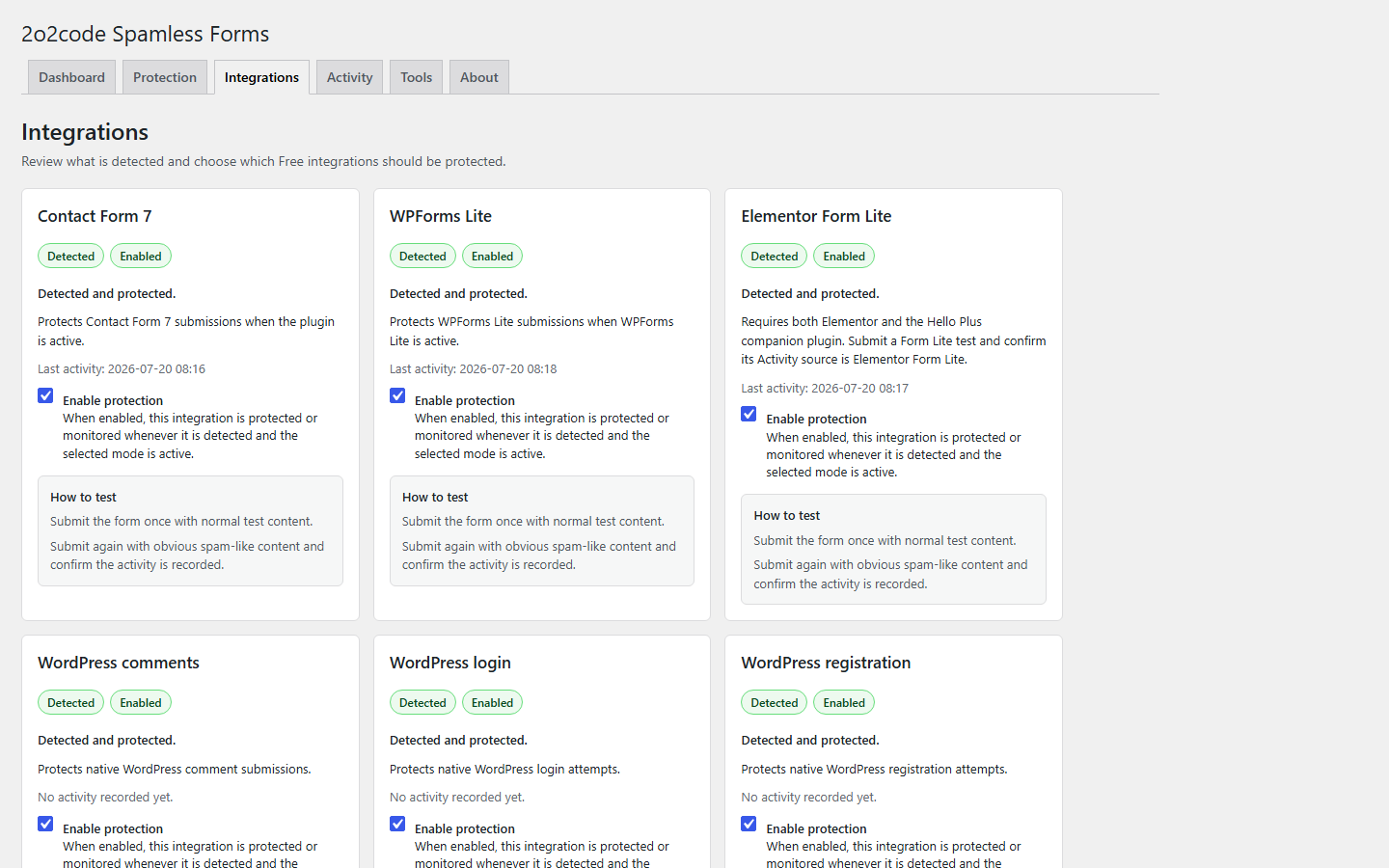
Integrations
Open Integrations to review detection and choose whether protection is enabled for each supported source. This section covers Contact Form 7 spam protection, WPForms Lite spam protection and Elementor Form Lite spam protection, together with native WordPress flows.
Contact Form 7
Protects Contact Form 7 submissions when the plugin is active. Blocked submissions use Contact Form 7’s native validation and error flow. Enable its protection preference, submit a normal test, then review its source and reason in Activity.
WPForms Lite
Protects WPForms Lite submissions when WPForms Lite is active. Enable protection, submit a normal test and confirm the expected WPForms success response.
Elementor Form Lite
Requires Elementor and the Hello Plus companion plugin. Hello Biz is the theme, not the Form Lite provider. Test the Form Lite widget and confirm its Activity source.
WordPress comments
Protects native WordPress comment submissions. Post a privacy-safe test comment and review the WordPress comments source in Activity.
WordPress login
When this integration is enabled, every native WordPress login request enters the shared protection engine, including requests without JavaScript protection fields. Use a controlled test account and never include a password in a support request.
WordPress registration
When this integration is enabled, every native WordPress registration request enters the shared protection engine, including requests without JavaScript protection fields. Use synthetic test details and review the WordPress registration Activity source.
Integration states
Detected and protected.
Detected and monitored.
Detected and enabled, but protection is disabled.
Detected, but protection is off for this integration.
Enabled preference saved; integration not detected.
Not detected or enabled.
Current Free scope
Elementor Pro Forms is planned for PRO. Elementor Atomic Forms, WooCommerce Checkout Blocks and WooCommerce Store API submissions are not supported in Free 1.0.0.
Integrations separates detection, the saved preference and the current protection state.10
Advanced Settings
Recommended
Keep the default values unless Activity shows a specific false-positive or missed-spam pattern. Change one setting at a time and test again.
Minimum fill time
Default / range
3 seconds / 1-60 seconds
What it controls
The shortest expected time for a human submission.
Lower value
More permissive for very short forms.
Higher value
More sensitive to fast submissions.
False-positive risk
Fast legitimate visitors may be flagged, especially on short forms.
Recommended examples: 3 seconds for a general contact form; 1-2 seconds for a very short name/newsletter form; 4-5 seconds for a longer enquiry form only after Monitor testing.
After changing: test one quick legitimate submission in Monitor. Safe ignores timing-only signals, Balanced records them as Suspicious and Strict blocks them in Protect.
Token lifetime
Default / range
1800 seconds (30 minutes) / 60-86400 seconds
What it controls
How long generated form verification remains valid.
Lower value
Shorter completion window; can affect users who leave a form open.
Higher value
Allows longer completion sessions.
False-positive risk
A value that is too low can reject long-open forms, cached pages or inactive browser tabs.
Recommended examples: 1800 seconds for general forms; 3600 for a longer support/application form; 600 only for a short-lived form after testing.
After changing: open the form, wait for a realistic completion period and submit normally. Include page caching in the test.
Rate limit window and threshold
Defaults / ranges
300 seconds and 5 submissions / 60-86400 seconds and 1-1000 submissions
What they control
The period in which repeated submissions are counted and the allowed count before rate limiting.
Lower threshold / longer window
More sensitive to repeated submissions.
Higher threshold / shorter window
More permissive for busy or shared networks.
False-positive risk
Visitors behind one shared public IP may contribute to the same pattern.
Recommended examples: 5 / 300 for a small-business site; 15 / 300 for a busy site or shared office/school/mobile network; 20 / 600 for a high-traffic support site.
After changing: use Monitor first, test repeated legitimate submissions, and check Activity. If legitimate users are affected, increase the threshold or shorten the window.
Link density threshold
Default / range
0.50 / 0.05-1.00
What it controls
How sensitive protection is to several links relative to normal text.
Lower value
More sensitive to link-heavy submissions.
Higher value
More permissive when legitimate messages contain multiple URLs.
False-positive risk
Technical support messages and URL-heavy enquiries may be flagged.
Recommended examples: 0.50 for general contact; 0.25-0.40 where legitimate messages rarely contain links; 0.70-0.80 for technical support forms.
After changing: test normal text, one useful link and a legitimate multi-link message. One normal useful link is not treated as link-density spam by itself.
11
Recommended configurations
These are starting examples, not preset buttons or universal guarantees.
A. General site
Protect, Balanced, 3s minimum, 1800s token, 5 / 300 rate limit, 0.50 link density, logging on, allowed logging off, 14 days, 100 records.
B. Initial rollout
Monitor, Balanced, advanced defaults, logging on, allowed logging temporarily on, 7 days, 250 records. Then disable allowed logging and switch to Protect.
C. Busy/shared network
Protect, Balanced, 2-3s minimum, 15 / 300 rate limit, 0.50-0.70 link density according to form use, 14 days, 500 records.
D. High spam volume
Begin with Protect and Balanced. Keep 3s, review Activity, tighten one setting at a time, and use Strict only after checking legitimate fast submissions.
12
Integration testing
Use Monitor first on business-critical forms.
Submit one normal message with synthetic, non-personal test content.
Confirm the form plugin’s normal success response.
Submit an obvious synthetic spam-like test without using real personal data.
Confirm the visitor receives a generic failure when Protect blocks the test.
Review the source, status and human-readable reason in Activity.
Repeat the procedure for each enabled Contact Form 7, WPForms Lite, Elementor Form Lite, comments, login or registration flow used by the site.
13
Troubleshooting
Legitimate submission was blocked
Check the Activity reason.
Switch temporarily to Monitor.
Use Safe or Balanced for timing issues.
Reduce minimum fill time.
Increase the rate-limit threshold or shorten its window.
Increase link density for URL-heavy forms.
Change one setting at a time.
Spam was allowed
Confirm Protect mode.
Confirm the integration is detected, enabled and protected.
Enable event logging for diagnosis.
Use Balanced first and test Strict carefully.
Review rate-limit and link-density settings.
No Activity appears
Verify event logging is enabled.
Allowed submissions are hidden unless allowed logging is enabled.
Normal submissions with no signal are not normally recorded.
Disabled creates no events.
Integration says Not detected
Confirm the form plugin is active.
For Elementor Form Lite, confirm Elementor and Hello Plus are active.
Refresh the page.
The enabled preference can remain saved while a provider is inactive.
No-JavaScript submission
A missing JavaScript verification token alone is Suspicious and allowed. Rate limiting and hard spam signals still apply when JavaScript is unavailable, and can block in Protect mode.
Generic frontend error
This is intentional. Detailed reasons appear only in Activity for administrators, not in visitor-facing errors.
Rate-limit false positive
Shared networks can contribute to the same pattern. Wait for the configured window, then carefully increase the threshold or shorten the window.
14
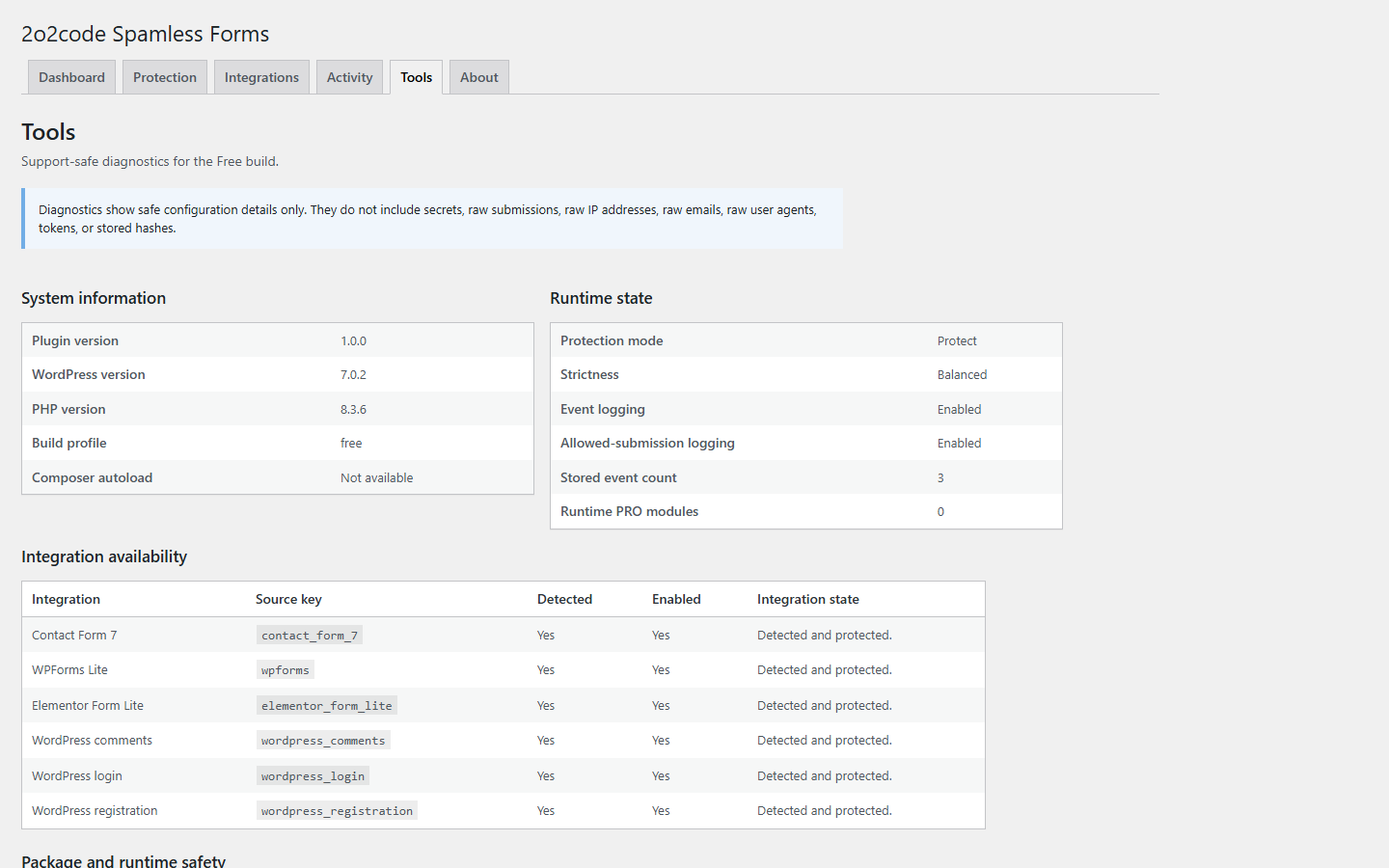
Tools and Diagnostics
Tools displays support-safe information such as plugin, WordPress and PHP versions, runtime mode, strictness, logging state, event count and integration availability. Technical integration keys may appear here so support can identify the exact source.
Diagnostics do not reveal complete submissions, raw identifiers, tokens, stored hashes, passwords or credentials. Include relevant version and state information in a support request, but never send passwords, complete submissions or personal data.
Tools provides configuration details that are safe to use when diagnosing an installation.15
Uninstall and data deletion
Setting
What happens when the plugin is deleted
Delete data on uninstall: Off
Plugin settings and Activity data remain.
Delete data on uninstall: On
Plugin settings, Activity data and known plugin-owned data are removed during uninstall.
Deletion is different from deactivation
Deactivation does not uninstall the plugin. Export or back up anything you need before deletion; recovery after uninstall data removal is not promised.
16
Frequently asked questions
Does 2o2code Spamless Forms use CAPTCHA?
No. It does not add CAPTCHA, puzzles or external verification widgets.
Does it send submissions to an external API?
No. Anti-spam checks run locally inside WordPress and the Free version does not call an external anti-spam scoring API.
Which form plugins are supported?
Version 1.0.0 supports Contact Form 7, WPForms Lite, Elementor Form Lite through Elementor and Hello Plus, WordPress comments, WordPress login and WordPress registration.
Does it store complete form submissions?
No. The Free version stores no complete form submissions. When event logging is enabled, it may store minimal Activity metadata without raw IP addresses, raw emails or raw user agents.
Why is a submission Suspicious but still allowed?
A signal was noticed but was not a blocking decision. Balanced timing signals, missing JavaScript verification alone and link-density signals can be Suspicious without blocking by themselves.
What is the recommended strictness?
Balanced is the recommended default for most sites. It records timing-only signals as Suspicious without blocking them by themselves.
What is Monitor mode?
Monitor observes spam-related decisions without blocking submissions. Those decisions appear in Activity when event logging is enabled.
Why is Form Lite not detected?
Elementor Form Lite requires both Elementor and the Hello Plus companion plugin to be active. Hello Biz is the theme and is not the Form Lite provider.
Does it support Elementor Pro Forms?
No. Elementor Pro Forms protection is planned for PRO and is not included in Free 1.0.0.
Does it support Elementor Atomic Forms?
No. Elementor Atomic Forms are not supported.
Does it support WooCommerce?
WooCommerce Checkout Blocks and Store API submissions are not supported in Free 1.0.0.
What should I do after changing Advanced Settings?
Change one value at a time, submit normal and synthetic spam-like tests, then review Activity before making another change.
Can visitors without JavaScript submit forms?
Yes. A missing JavaScript verification token alone is marked Suspicious and allowed. Rate limiting and hard spam signals still apply when JavaScript is unavailable, and can block the submission in Protect mode.
Will it slow down the site?
The plugin performs local checks during supported submissions and does not wait for an external scoring API. Actual impact depends on the WordPress site, hosting and integrations; use Tools and normal site diagnostics if you notice a problem.
How do I report a false positive?
Switch temporarily to Monitor, note the human-readable Activity reason, reproduce with synthetic data and send the support checklist below with personal data removed.
17
Support
For setup help, a false positive or an integration question, use the existing 2o2code support or contact page.
Safe support checklist
WordPress version
PHP version
Form plugin and version
2o2code Spamless Forms mode and strictness
Human-readable Activity reason
Steps to reproduce
Screenshot with personal data removed
Never send
Passwords, complete form submissions, private customer information, raw server credentials or raw database credentials.